|
The Log window

The details and outcome of the different sequence assembly/processing functions are displayed in the log.
The Log window is located in the Project Manager. To switch to it just click the Log tab.
DNA Baser automatically opens the Log window after it finishes the assembly process if the checkbox Auto switch to log is checked.
To switch back from the Log window to Sample Explorer click the Project Builder tab.
An alternate way quickly switch from Log to Sample Explorer is to click or double click the log. If you want you can disable this behavior by un-checking the option Close log window on click.
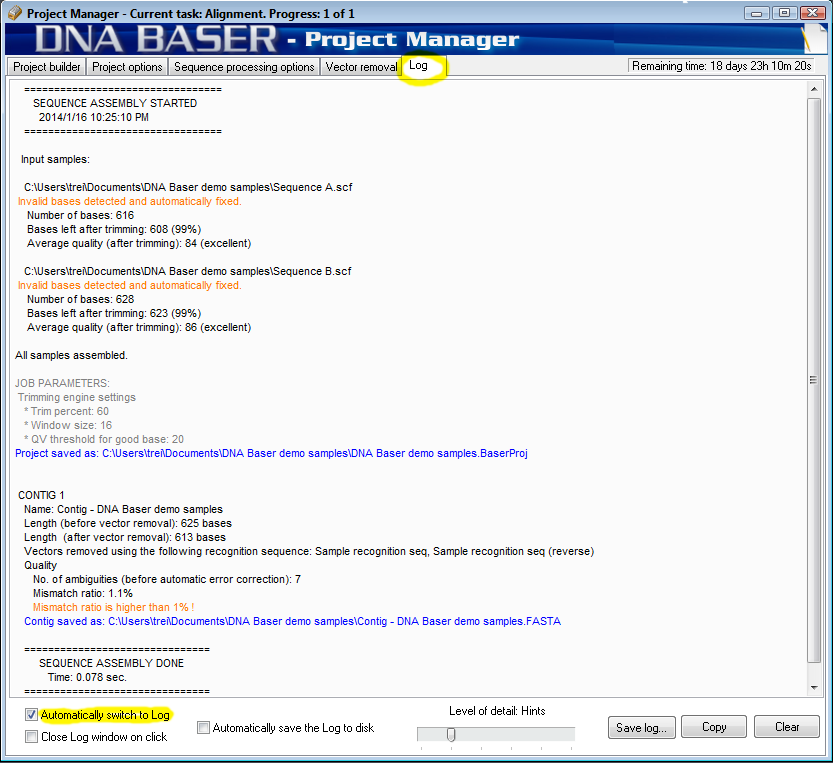
The log gives you info about:
- which file has been added to contig
- how many of the input files were assembled
- neighbors for each sequence (on "verbose" mode)
- how many bases each sequence contains
- how many of those bases are 'good bases' (bases with a confidence score high enough to be trusted).
- the length of the assembled contig
- the number of errors/ambiguities/mismatches
- the contaminant vector sequences found (and removed)
- the processing time (in seconds)
- possible errors and warnings
- the path where the projects was saved (only if DNA Baser was instructed to automatically save the project)
- the path where the contig was saved (only if DNA Baser was instructed to automatically save the contig)
- trimming engine settings
- assembly parameters/scores
- metadata integration
- etc
To decrease the amount of information, move the "Log level of details" from "hints" (default) to "info" or "warnings". To increase the amount of information, move the "Log level of details" from "hints" (default) to "verbose".
 Close log on single click - Clicking the log window will close it. You can reopen it by clicking this button. Information contained in the log will not be lost. Close log on single click - Clicking the log window will close it. You can reopen it by clicking this button. Information contained in the log will not be lost.
Auto switch to log window - The user can enable/disable the automatic saving by checking/unchecking the "Automatically save log to disk" box.
|








