  |
       |
|
 |
||
 |
The Assembly window
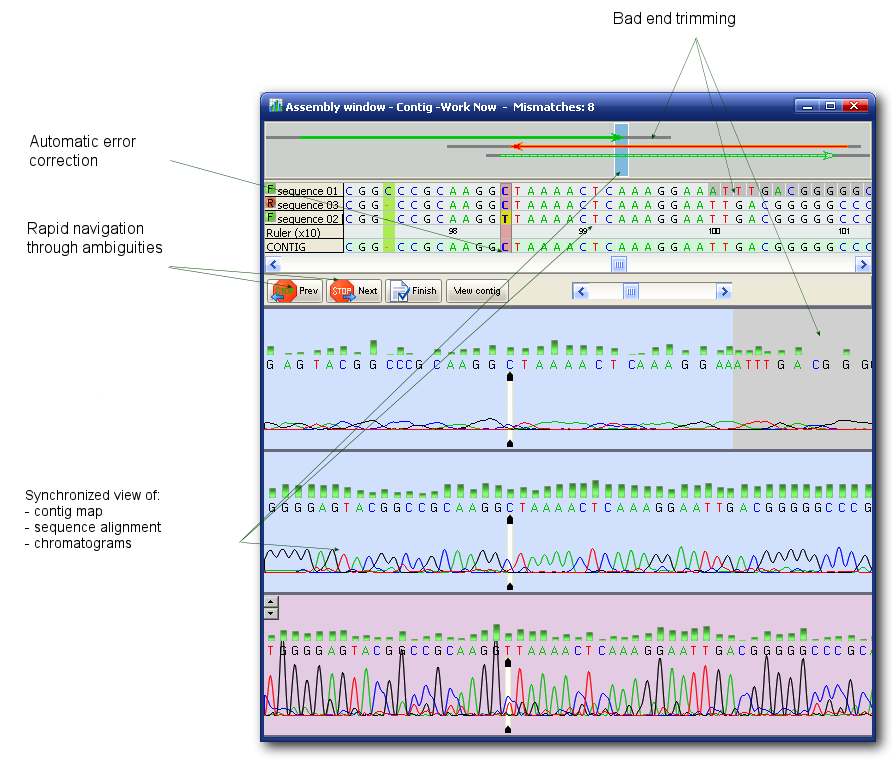
The CONTING MAP, the ASSEMBLY GRID and the CHROMATOGRAM VIEWER are correlated, resulting in a synchronized display of the chromatograms, contig and contig map. This makes the correction of ambiguous bases much faster and easier.
Most functions related to this window are available in the main menu but some that often used are available via pop-up menu (right click on a sample to pop the menu) or right under the contig grid:
The user's hands-on time is minimized by our AMBIGUITY NAVIGATION SYSTEM that guides the user from ambiguity to ambiguity and allows fast editing of ambiguous bases. Details about this module here.
Colors in DNA Baser
In the ASSEMBLY GRID, the ambiguous bases are highlighted with the red color. The low quality bases in the untrusted regions removed by the Trimming Engine have a gray background. The recognition sequences used for vector removal are highlighted in light blue. The selection is yellow and the reference sequence is pink.
DNA Baser does not offer SNP functionality per se. In case of SNP the base suggested by DNA Baser is not an IUPAC ambiguous base. However, DNA Baser highlights (see figure above) the ambiguities (SNP can be considered an ambiguity also) so you can use the Ambiguity Navigation System to navigate between SNP points.
|
|
 |
||
| SciVance Technologies |
|

 - Save changes to the contig and close the current window.
 - See how the contig looks after it was saved to disk.
 - Adjust the position of the bases relative to the peaks. It applies to the currently selected sample.
 - Show/hide the contig map.
 - Increase/decrease peak height. It applies to the currently selected sample.
 - Navigate to the next ambiguous base.
 - Navigate to the previous ambiguous base.


