sequence assemblingDNA sequence assembly
DNA BASER-The sequence assembler-Home pageFeatures and performancesScreen shotsPricesInfo and news.Download a full working versionContact us
molecular biology software
scf trace assembly

Sequence assembly FAQ


DNA Baser Assembler - Automatic DNA sequence assembly software


Why DNA Baser cannot assemble (some of) my files?


A quick look into the LOG will tell you why. In most cases is because DNA Baser Assembler automatically removed some of your samples from the job list. This happens when the quality of the samples is below a certain threshold. To force DNA Baser to keep even the low quality samples, you need to relax the “Trimming engine” parameters (DNA Baser can automatically trim low quality ends of your samples) and the “Assembler engine” parameters. However, this may result sometimes in more errors/ambiguities in your conting which means more manual work to correct them. Therefore, if you have enough redundant samples in the set of files that you want to assemble, it is better to let DNA Baser to exclude the samples with low quality (the samples that may introduce ambiguities).

Another reason may be that the sample does not really belong to the current contig. In this case you will get a message saying "Sample [xxx] has no neighbors".


DNA Baser does not create the contig with the right orientation


The SCF/ABI/FASTA samples you receive from your sequencing machine are in random order (each user can use its own naming scheme). Therefore, DNA Baser cannot know the orientation of your contig. We will add in the near future an input box where you can designate on of your samples as being forward or reverse. The orientation of the contig will then be changed according to this information.

Temporary solutions:

 * You can use one of your samples (the one that you know it is "forward") as reference and align the rest of your samples to this reference.

 * You can user the "View reverse complement of contig" (available in the "Contig" menu in "Assembly" window) function to change the orientation of the contig.


Do I have to save the contig every time I assemble some samples?


No. DNA Baser Assembler will automatically save the contig for you at the end of the assembly process. After you have pressed the 'Start assembly' button the program will automatically trim bad ends, assemble the contig, correct the errors and save the contig to. This is just one of the many automations you will find in DNA Baser Assembler.


I have an error saying: Cannot open file… The process cannot access the file because it is being used by another process” or “EFOpenError".


DNA Baser does not lock the files that it opens. This way it allows you to open the same file multiple times without generation sharing violations.
However, other programs do not allow you to do that. For example if you open a FASTA file in Microsoft Word, Word will lock that file. Any other program that will try to open it will fail as long as the file is opened in Word. We recently created a workaround this issue but works only for FASTA/SEQ/TXT files. The SCF and ABI files are still under this restriction.
Workaround: do not open the same file in DNA Baser Assembler and other programs (that are using locking techniques) at the same time.


DNA Baser does not cut the recognition sequence (vector) correctly OR

DNA Baser saves only a small part (only the vector) of the contig to disk


This happens when the two recognition sequences used are the exact reverse complement of each other. To solve this, you need to change one of the recognition sequence (e.g. by adding more bases) such that, when reverse complemented, it will not be identical with the other recognition sequence.


FAQ about file formats


What kind of sample files does DNA Baser recognize?


DNA Baser Assembler supports ABI (all varieties), SCF, TXT, SEQ and plain FASTA files. Whenever possible you should use chromatogram files (SCF/ABI) instead of FASTA files.


Why I should prefer chromatogram files (SCF/ABI) over Fasta files?


DNA Baser Assembler is a tool like no other. One of its outstanding features is the capability to perform time consuming task (task that until now could only be done manually) instantly. For example by using DNA Baser Assembler you do not have to inspect your contig or manually correct the ambiguities. DNA Baser Assembler will do it for you. However, this feature works only if your input samples contain information about the quality of each base (QV or quality values). Therefore, whenever is possible you should use chromatogram files (SCF/ABI) files instead of FASTA files, empowering DNA Baser to automatically suggest corrections for the ambiguities. The accuracy of the suggestions can be as high as 95-99% and in most cases you don't have to do any manual editing/corrections in your contig. This will save a lot of your precious time!!


What about multi-Fasta?


Multi Fasta is supported indirectly after you convert it to regular Fasta. We included a free tool in DNA Baser for this (located under the Tools menu). With only few clicks you can convert your multi-Fasta files to Fasta. This tool is located under the Tools menu. This tool extracts all samples from your multi-Fasta file and saves them as regular Fasta files in a folder.


Does DNA Baser support FNA or FA files?


Because of the lack of standardization, miscellaneous software may output Fasta files using exotic extensions like “FST”, “FNA”, “FAS”, “FST” or “FA”. We try to make the program compatible with as many formats as possible. If DNA Baser does not recognize your file(s) but you are sure it is a valid FASTA file, then you need to change its extension to Fasta.


How can I change the file extension of a file (sample)?


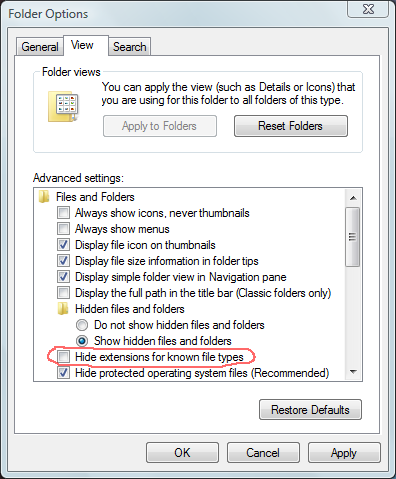
In some cases you cannot change the extension of a file because by default Windows is hiding this information. Here is how to make Windows to show this information:


1. Double-click "My Computer".
2. Click the "Tools" menu and select "Options".
3. When the "Folder Options" multi-tabbed dialog box appears, select the "View" tab.
4. Uncheck "Hide file extensions for known file types"
5. Press OK to close the dialog box.


Purchase/Order details FAQ


I need your bank details in order to send the payment


Please DO NOT send the payment to us. All orders should go through our reseller Plimus. Details about how the PO should be processed will be available on the screen at the moment when you generate your PO. Plimus bank details will be also available on the screen (see the "Place order by..." links at the bottom of the screen, bellow the PO body). The PO should look like this.


Do I have to pay again when an update of DNA Baser Assembler is available?


No. All updates (subversions) are free of charge for our customers. DNA Baser will automatically inform you when a new update is out. Just make sure that the 'auto-update' feature is enabled.


Can you send me a quote (proforma invoice)?


You can have it in 2 minutes by using this automatic Proforma Invoice Generator. Please make sure that you choose the right type of currency (we support over 70 currencies). Please remember to pay in the currency stated on the Proforma.


I am not a customer. Can I get support?


Sure. We treat both customers and trial users with the same attention. For details, please see this document.


Do I need to contact you before purchasing?


No. The whole process is automated. You filled the purchase form and the system automatically process your order and send your unlock key (CD). However, if you have questions that are not yet answered on our web site we will gladly answer them, so please don't hesitate to contact us.


I am from Asia. How can I order?


No matter from which country/region you are. Your order will be placed from a single central page.


Do you accept other currencies beside US dollars?


Yes. We accept over 70 types of currencies.


Can I receive a CD?


Yes. Please check the "Order CD" check box in the order page.


How long do I have to wait for my CD to arrive?


The CD is mailed from California USA. Based on your location it may take from 1 to 7 days to reach you. Please remember that you DO NOT have to wait for the CD to arrive. We will send you the key, right after you place the order. Therefore, if you download the software from our web site, you can start use it right away.


Can I test the program before purchase?


Actually we strongly recommend you to check if the software fills your needs. Please download the full working trial from our web site. The download is instant - you don't have to fill in any private data (like name, email, company...)


General FAQ


I need a small feature. Can you implement it?


HeracleSoftware provides effective, easy-to-use sequence assembly and analysis software tools to meet the ever changing needs of today’s genetic/medical researcher and diagnostician. All of our software tools are the result of close, effective collaborations with the genetic community. Therefore, if one of our software programs doesn't meet your exact needs, please do not hesitate to contact us. After all DNA Baser is made for you.


DNA chromatogram assembly
contig assembly software